Friday, July 21

5 Useful Python Tips

Here are a few useful Python tips I’ve learned over time.


1. When using the '%' format operator always put a tuple or a dictionary on the right hand side.


Instead of:
  print "output %s" % stuff


Write:
  print "output %s" % (stuff,)


With the tuple on the right hand side, if stuff is itself a tuple with more than one element we'll still get its representation instead of an error.


Example:
  >>> def output(arg):
            print "output %s" % arg

  >>> output("one item")
  output one item

  >>> output(('single tuple',))
  output single tuple

  >>> output(('tuple','multiple','items'))

  Traceback (most recent call last):
  File "", line 1, in -toplevel-
  output(('tuple','multiple','items'))
  File "", line 2, in output
  print "output %s" % arg
  TypeError: not all arguments converted during string formatting


Now, if the function output is changed to:
  >>> def output(arg):
            print "output %s" % (arg,)

  >>> output(('tuple','multiple','items'))
  output ('tuple', 'multiple', 'items')


It will always work as intended and expected.


2. Use the built-in timer function proactively and aggressively to avoid "premature pessimization".


Python has a very useful built-in timing framework, the timeit module, which can be used interactively to time the execution of short pieces of code.
Suppose we want to find out if a hypothetical word_count implementation is faster using the split() method or using a loop.
We'd like to implement each variant, call each implementation many times, repeat the entire test a few times, and select the one that took the least time.

Timeit.py to the rescue. Let's test the implementation using split() first.

  >>> import timeit
  >>> def word_count():
            s = "long string with several words to be counted "
            return len(s.split())

  >>> word_count()
  8

  >>> t = timeit.Timer(setup ='from __main__ import word_count', stmt='word_count()')

  >>> t.repeat(3, 1000000)
  [4.6016188913206406, 4.5184541602204717, 4.5227482723247476]


And now let's test a loop variant.
  >>> def word_count():
            s = "long string with several words to be counted "
            return len([c for c in s if c.isspace()])

  >>> word_count()
  8

  >>> t = timeit.Timer(setup ='from __main__ import word_count', stmt='word_count()')

  >>> t.repeat(3, 1000000)
  [17.766925246011169, 17.784756763845962, 17.890987803859275]


We have our informed answer right there and then.


The first argument of repeat() is the number of times to repeat the entire test, and the second argument is the number of times to execute the timed statement per test.


You can even select the best out of X runs (3 on this example) by using the min function
  >>> min(t.repeat(3, 1000000))
  17.766925246011169


We can try and compare other implementations such as a loop without the (expensive) call to isspace().

  >>> def word_count():
            s = "long string with several words to be counted "
            return len([c for c in s if c == ' '])

  >>> word_count()
  8

  >>> t = timeit.Timer(setup ='from __main__ import word_count', stmt='word_count()')

  >>> t.repeat(3, 1000000)
  [8.8144601897920438, 8.7707542444240971, 8.7721205513323639]


Which proves faster than our second implementation but still slower than calling split().


Note:
Instead of repeat() we can call timeit(), which calls the function 1 million times and returns the number of seconds it took to do it.


3. Don't traverse to append, extend instead.


Don't do:
  >>> def bad_append():
            l1 = ["long","string","with","long"]
            l2 = ["elements","and","words","to","be","counted","or","words"]
            for item in l2:
                  l1.append(item)

  >>> t = timeit.Timer(setup ='from __main__ import bad_append', stmt='bad_append()')

  >>> min(t.repeat(3, 1000000))
  5.4943255206744652


Do instead:
  >>> def good_append():
            l1 = ["long","string","with","long"]
            l2 = ["elements","and","words","to","be","counted","or","words"]
              l1.extend(l2)

  >>> t = timeit.Timer(setup ='from __main__ import good_append', stmt='good_append()')

  >>> min(t.repeat(3, 1000000))
  2.3049167103836226


Calling extend() results in an almost 60% performance gain.


4. Beware of doing string concatenation using '+'.


Let's see why with "no fluff just stuff" by applying golden rule 2 above.
Bad:
  >>> def bad_concat():
            s = ""
            l = ["items", "to", "append"]
            for sub in l:
                  s += sub

  >>> t = timeit.Timer(setup ='from __main__ import bad_concat', stmt='bad_concat()')

  >>> min(t.repeat(3, 1000000))
  1.6777893348917132


Better:
  >>> def good_concat():
            s = ""
            l = ["items", "to","append"]
            s = "".join(l)

  >>> t = timeit.Timer(setup ='from __main__ import good_concat', stmt='good_concat()')

  >>> min(t.repeat(3, 1000000))
  1.3923049870645627


Needless to say all this adds up if these operations are done repeatedly and with bigger lists.


Also avoid:
  out = "output: " + output + ", message: " + message + ", param: " + param


Instead, use:
  out = "output: %s, message: %s, param: %s" % (output, message ,param, )


Which neatly combines rules 1 and 4.


5. Environment settings and variables are available cross-platform.


This is a very handy feature. Take a close look at os.path.expanduser() and os.environ on Linux and Windows.


*Nix:
  >>> import os
  >>> os.path.join(os.path.expanduser('~'))
  '/home/jcastro/'


Windows:
  >>> import os
  >>> os.path.join(os.path.expanduser('~'))
  'C:'


Useful Online Resources

The Python Coding Conventions
Python Performance Tips
Patterns in Python
Data Structures and Algorithms with Object-Oriented Design Patterns in Python
The Python Tutor Mailing List
My Python links on del.icio.us

Saturday, July 15

Happy Feet

Shown tonight, during the opening of Superman Returns


More here.

Thursday, July 13

RIP Syd


Thank you for the wonderful legacy.

Sunday, June 18

What's in a Name?

I had a Malay housemate called Kamarun Kamarundil (he would, when introduced, always give the shorter version Nick).
I have a Thai friend called Kamontip Sapphawaht.
I absolutely love their names, and can already see the trailer for a Hollywood romantic blockbuster titled When Kamarun Kamarundil met Kamontip Sapphawaht...

Monday, June 12

John Long Prize

On a letter dated November 2005 that I only had access to yesterday, I found out that my thesis was awarded the "John Long Prize for best research thesis"!

Thank you very much to all those mentioned in my acknowledgments section (and maybe a few others who were sadly forgotten)
If there is any cash involved a promise will be made right here and now to spend (some of) it well and wisely on a nice open BBQ with free drinks for all!
(sadly, no cash prize = no free BBQ+drinks for all)

Now ain't I a happy, lucky chap...

Monday, May 1

Out of (the) Box

Things I am missing from Box.net:

  1. Drag-and-drop files onto newly created folders. Currently we can change a file's location through its contextual drop-down menu)
  2. Share folders by drag-and-drop. Currently we have to share files by ticking each checkbox individually.
  3. Email notifications when friends access/download shared files. Otherwise, we have to poll them to acknowledge receipt.
So no, I don't think Box gets it yet.

Amazon suggests

http://www.mybigriver.com/

Thursday, April 6

Sand art


And there's more here.

Wednesday, April 5

My Personal DNA

My Personal Dna Report [hover on the image for details]


Get yours here.

2005 In Retrospect: Blogs

There is a group of blogs that I check once daily, labelled "important" on my Bloglines blogroll. When new blogs are promoted to this "elite" group other blogs are demoted to the "Quarentine" one. (helpful taxonomy inspired by this, this, and David Allen's Getting Things Done)

Below are 5 blogs of "elite quality" that I'm really enjoying reading.

All Kinds Of Stuff
John Kricfalusi is no other than the creator of the Ren and Stimpy tv series. With these credentials he didn't need much more to convince me, but you know what, his blog is very refreshing and inundated with precious teachings.

Let The Good Times Roll
Here's how to suck up to a blogger: when I grow up I'd love to be as charismatic, inspirational, charming, and overflowing with wisdom as Guy Kawasaki.

AVC
Fred talks from the Venture Capital world in ways that I can understand.

Enplaned
This is how the blogosphere works: Up until Joel mentioned them, I never thought I'd be interested in reading about the aviation industry. Now I can't stop.

Epsilon-Delta: Mathematics and Computer Programming
Yes, I like mathematics and I yes, maybe I can't stay too far away from computer programming. But I'll be damned if Ted Dziuba isn't a talented writer, able to make these two "scary-for-most-people" subjects attractive.


Runners up: The Dilbert Blog, Funny Cute, Post Secret, Tom Peter's Weblog, Niniane's blog


Related posts:
2005 In Retrospect: Technology
2005 In Retrospect: Music

"Loans that change lives"

I have been following Dav Yaginuma's blog, AkuAku, for a few years now. It is undeniable that he is a proper hacker and coder extraordinaire. To me, he also comes across as an inspirational, passionate, creative, dedicated, and humane individual. In this post, he introduced me to Kiva, a site where people can loan money to small business in developing countries. I like the empowering idea of a loan free of middle man, so I too have opened an account and donated.


Cheers Dav.

Tuesday, April 4

Let the good times roll - part II

Despite its evident flaws (and the fact that my feminine side is highly exacerbated by their algorithm), I really like MyHeritage.
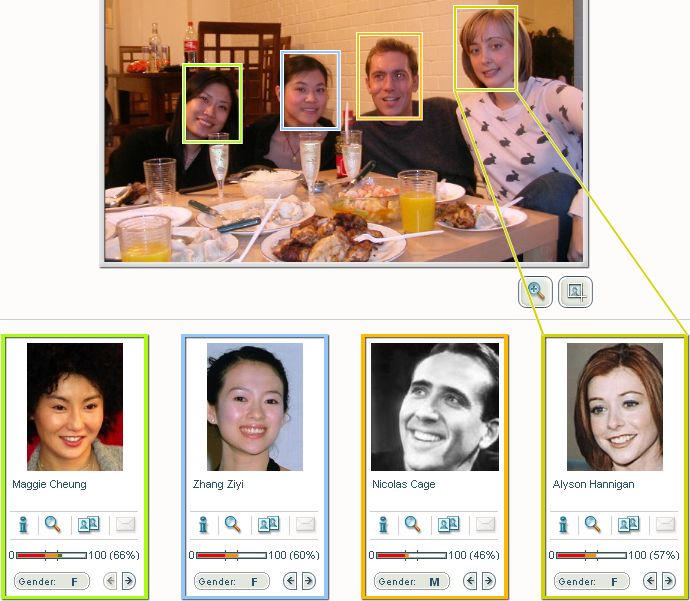
I uploaded Sunday's pictures to find out a bit more about my friends. It turns out they have a lot to explain...

Deanna's real name is Maggie Cheung, Jia and Zhang Ziyi have never been seen together in the same place (raising suspicions they're one and the same), Peter is a Nicolas Cage clone, and Rachel and Alyson Hannigan are twins separated at birth. [Click on the images to enlarge]


Jang Nara is no one but Rachel in disguise, Willo's part-time-job-we-were-never-allowed-to-know-about is modelling as Song Hye-Kyo, and my good friend Bo goes undercover as the philosopher John Dewey.

Sadly, the system didn't pick up my face :(

Let the good times roll

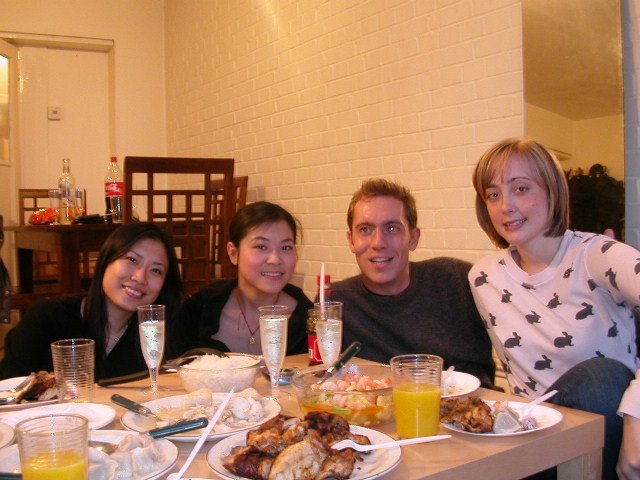
Dinner at my place: not enough plates, wine glasses, chairs, and cutlery (!), but still good fun. Great to see everybody and catch up with what they're doing.

Left to right: Rachel, Willo, Bo, and myself.
Left to right: Deanna, Jia, Peter, and Rachel

Friday, March 24

Thursday, March 23

David Allen vs Tom Peters

It seems David Allen

Even as late as the 1980s many professionals considered having a pocket Day-Timer the essence of being organized, and many people today think of their calendar as the central tool for being in control.
...
What you've probably discovered, at least at some level, is that a calendar, though important, can really effectively manage only a small portion of what you need to organize.
...
The real issue is how we manage actions.
[from Getting Things Done]

fundamentally disagrees with Tom Peters
You = Your calendar.
THIS IS MY #1 BELIEF ABOUT MANAGEMENT

(also: am I the only one to think they actually kind of look alike?)

Wednesday, March 22

Poor usability 2: Google Video


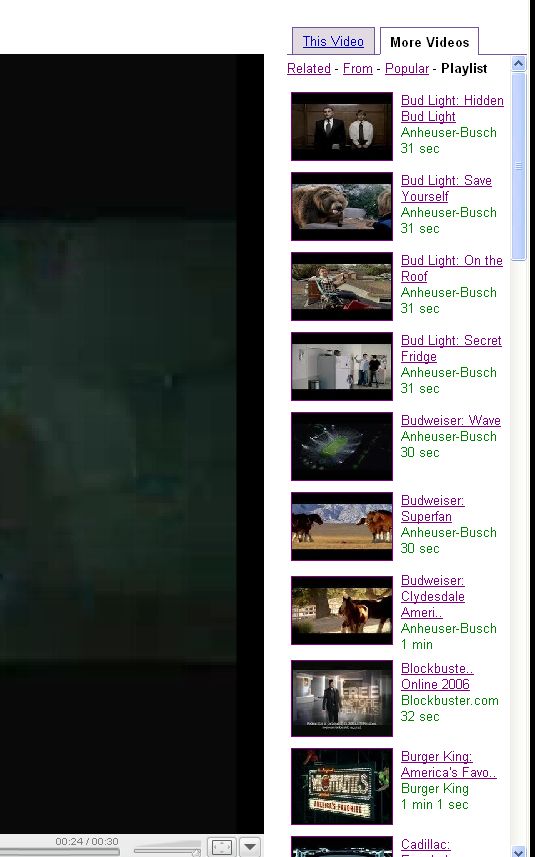
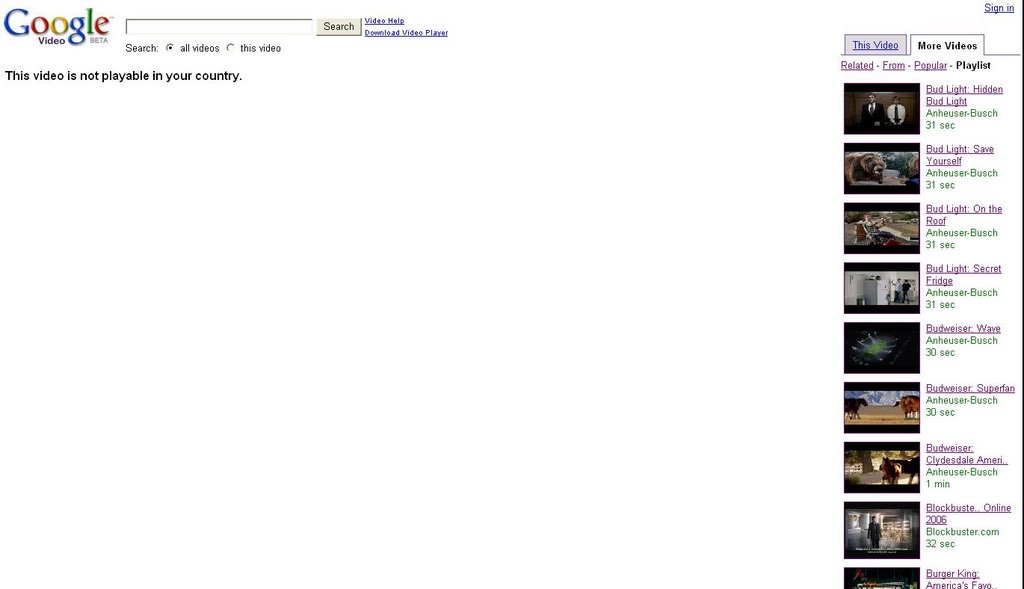
I find this one quite evil. If the chosen video "is not playable in my country", it shouldn't have been made available to me in the first place. Out of sight out of mind, right?
About Face 2.0 has something to say too:

Considerate software uses common sense


This one is a fundamental problem with navigation implementations using HTML frames. As you progress on the list and select an item after scrolling down, the scrollbar returns to the beginning of the list every time a refresh occurs. Thus, we're constantly scrolling up and down the list to go through all items. My favorite web aggregator, Bloglines, suffers from the same (quite annoying) problem.
Of course, there is an About Face 2.0 quote applicable:

Considerate software is perceptive
Software should watch our preferences and remember them without being explicitly asked to do so. If we always maximize an application to use the entire screen, the application should get the idea after a few sessions and always launch in that configuration. The same goes for placement of palettes, default tools, frequently used templates, and other useful settings.

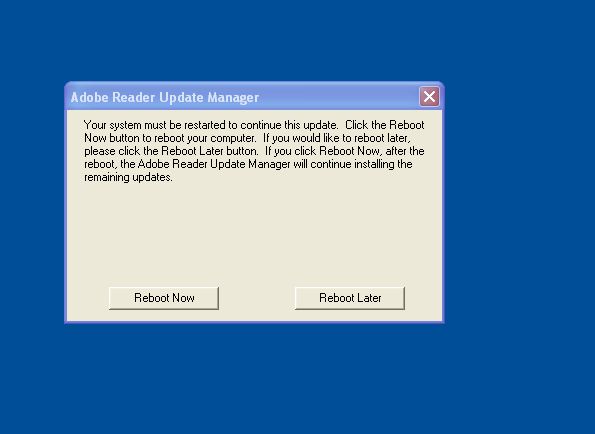
Poor usability: Adobe


About Face 2.0 to the rescue:
Considerate software is self-confident
Are you sure? Are you really sure? Are you really, really sure?

And
Considerate software doesn't burden you with its personal problems
Software whines at us with error messages, interrupts us with confirmation dialog boxes, and brags to us with unnecessary notifications. We aren't interested in the program's crisis of confidence about whether or not to purge its recycle bin. We don't want to hear its whining about not being sure where to put a file on disk. We don't need to see information about the computer's data transfer rates and its loading sequence, any more than we need information about the customer service agent's unhappy love affair.

Well, I certainly won't like to reboot -not now, not later. Since I'm updating your software, all I need to know is: do I have to reboot to successfully update? Nothing more, nothing less.


Perhaps this is just me being anal but I find the label 'Quit' on the button rather annoying. The installation is complete, so what exactly am I quitting?
The only operation left seems to be close the window. Why not simply say that?

Tuesday, March 21

StringTokenizer

Note to self:
StringTokenizer is deprecated. Should use the split() method of the String class instead. Split() is faster and returns an array of tokens ready to be used.

Monday, March 13

My 2 cents

I know, The Daily WTF does a great job at doing this, but I really liked these error messages I was presented with recently.
Writely showed me this very funny pop-up dialog box:


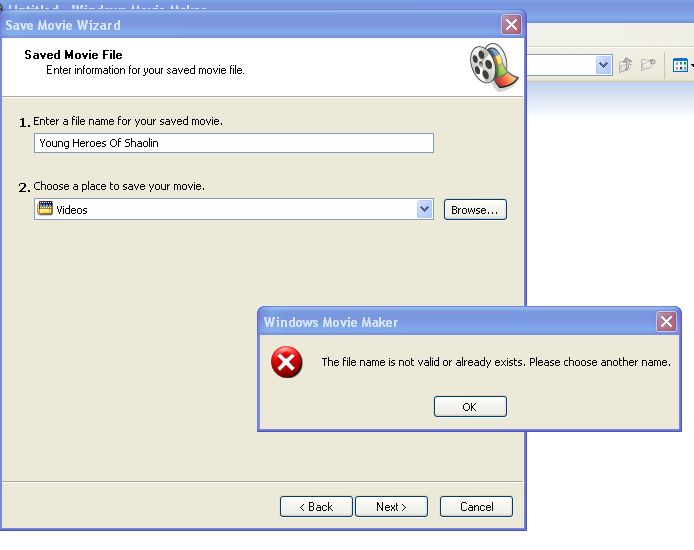
Windows Movie Maker annoyed me with this one:

I'll make mine the words of Alan Cooper on About Face 2.0:

Considerate software is conscientious
If we rely on a word processor to draft a new MicroBlitz Contract and then try to [save it in the same folder as an existing, but older, MicroBlitz Contract], the program offers the choice of either overwriting and destroying the old contract or not saving it at all. The program not only isn't as capable as [a human assistant who saw
the name conflict and appropriately renamed the contracts], it isn't even as capable as [a human assistant who put the two contracts in the same folder]. It is stupider than a complete idiot. The software is dumb enough to make an assumption that because they have the same name, I meant to throw the old one away.


And my own 2 cents on WMM's error message:

  1. If there is such a thing as an invalid filename, tell me before hand what my valid options are. Don't wait until I use "invalid" options to let me know I've used them, right? It is worth mentioning that even after the input validation I was not told what those invalid names were. This inconsiderate application seems to want me to keep trying until I get it right.

  2. What happened to the option to overwrite an existing file, asking for my consent? That was actually what I wanted to do but was forced instead to save the file with a bogus name, delete previous one manually, and then rename bogus-named one with the intended name. There seems to be total lack of attention to detail and lazy programming here.

Friday, March 10