Saturday, February 10

Vista Enterprise review

As a bizarre new year resolution, I decided to guinea pig for Microsoft and have been using Windows Vista Enterprise Edition since January. I wanted to see if it addressed the many problems I have with XP Pro, even after SP2. Below is my top 5 list of complaints that I would have liked to see fixed on the new OS:

  1. Need to restart OS after software updates. Enough said.
  2. Fix underlying file copy algorithm and its often absurd time estimates. Raymond has the details.
  3. On my 1.86 GHz Pentium M Processor with 2GB RAM laptop, trying to copy (or simply read) a damaged CD or DVD can cause the whole system to slow down to a halt unless the whole process is killed. Killing the process is sometimes very time consuming and frustrating -the OS just doesn't seem to be in control and I need to repeat the instruction several times. Worse, I sometimes get the dreaded blue screen.
  4. The streaming experience of Windows Media on XP is ghastly. Even on a reasonably fast network the buffering is useless (and clueless, really) and provides an awful user experience. The contrast with Apple's Quicktime is embarrassing for Microsoft's product.
  5. The "Safely Remove Device" feature is often unable to perform the operation, requiring (again) repeating the command multiple times (or changing settings). It often returns the useless message "This device cannot be stopped right now" even though there is nothing else running on the machine that could possibly be accessing the device.
So, how is it with Vista Enterprise?
Well, it certainly looks good.
Also, with the same hardware configuration, it feels faster and more responsive than XP.
However, despite the initial wow with the Aero UI, the harsh reality after only a few weeks of use is that:
  1. I had to restart the system after updates. Not once, not twice. Many, many times. I find this unacceptable and I am not alone.
  2. I had blue screens. I had one (caused by reading a damaged DVD), and a colleague of mine at work already had 2 in 2 weeks of use (he is using Windows Vista Ultimate Edition, though).
  3. The new copy/move dialog is still slow, inaccurate, and just painful to use, especially when moving large numbers of (large) files. I wish I could disable the time estimate feature completely to avoid the annoying "preparing to copy" step that can take a really long time.
  4. Streaming capabilities of Windows Media seem to be improved.
  5. "Safely Remove Device" feature still has the above mentioned mood swings.

1 in 5 is not good. Not good enough.

On top of this, Vista's crises of confidence and personal problems are extremely irritating: UAC? What were they thinking? Raymond writes, back in 2003, that users don't read dialogs. Popping a dialog every minute is a sure way to induce dialog-blindness across the user base. Other people agree: there is too much intrusion breaking activity flows, and there are too many confirmations required.

It also seems Vista, despite its 5 years in development, is somewhat unfinished and unpolished. Underneath the Aero beauty plenty of XP and pre-XP horror creeps in.

2007/03/26 Update: More people noticed the copy/move/delete slowness.

Wednesday, January 3

The Riddler

...though I'd rather be The Joker :)

Your results:

You are The Riddler


Riddle me that, riddle me this, who is obsessed with having a battle of wits??


Take the Supervillain Personality Quiz

Saturday, December 30

Superman

Although it seems I am also (disturbingly) 72% Wonder Woman and 72% Supergirl...

Your results:
You are Superman


Superman
90%
The Flash
75%
Wonder Woman
72%
Supergirl
72%
Green Lantern
70%
Robin
65%
Spider-Man
65%
Iron Man
65%
Catwoman
55%
Batman
50%
Hulk
40%
You are mild-mannered, good,
strong and you love to help others.


Take the Superhero Personality Test

Wednesday, December 20

Jiim

Oooh, they grow up so fast!

Branding the Captcha

I really dig Seth's idea for a centralized Captcha server everyone could use for free. His monetization suggestion of "Type the brand you see above, please" has lots of potential in its simplicity.
There could be conflict of interests, like being shown a NetSuite's ad whilst signing up for a Salesforce service.

Very juicy and thought-provoking, in typical Seth fashion.

Update: it didn't take too long to see this one implemented: cool, online demo here.

Tuesday, October 17

Joy


Video is also available on Transbuddha.

Thursday, September 14

Wednesday, September 6

Monday, September 4

Quotes Entirely Relevant to Software Engineers

Bodies are like diskettes with tags. You click on to them and you can see the size and type of file immediately. On people, this labeling occurs on the face.


by Douglas Coupland

Saturday, September 2

Tuesday, August 22

Step-by-step guide to TestNG

TestNG is a flexible testing framework developed by Cédric Beust and Alexandru Popescu. It is a much more powerful alternative to JUnit that fixes and improves many of its shortcomings.

In this introductory guide I will show how to setup and integrate TestNG with IDEA, hoping to highlight specific gems of TestNG in the process.

TestNG at a Glance

Here's a short list of my favorite features:

  • Ability to run existing JUnit test without any problem, providing a smooth transition path from JUnit to TestNG;
  • Ability to specify individual method thread pools;
  • Ability to specify certain test methods as dependent on the successful completion of others;
  • Separation of Java code from the way tests are run -run all tests, some tests, or only a few test methods of a given class. No need to recompile classes to run a different set of tests or suites;
  • Seamless integration with IDEA and Eclipse;

IDEA Setup

  • Download the latest TestNG library from http://testng.org/doc/download.html. My examples here are based on version 5.0.
  • Unzip the contents of the archive onto a directory of your choice.
  • Launch IDEA and create a new project of Java Module Type. I created one labeled testng.
  • Go to File->Settings, or press CTRL+Alt+S, to launch the IDE Settings panel.
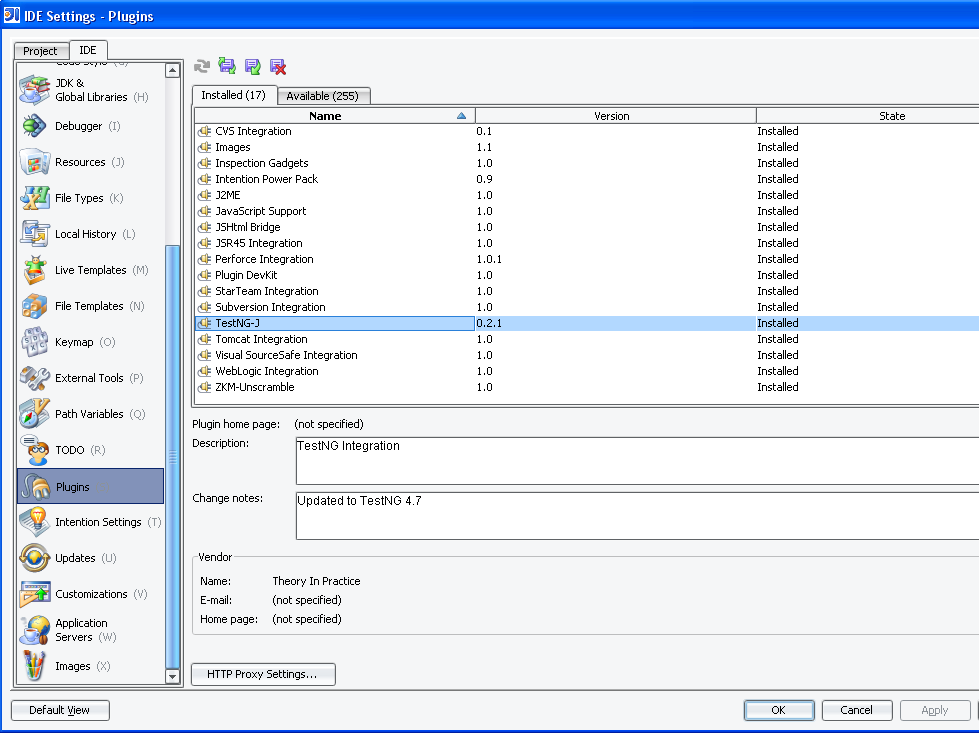
  • From within the IDE Settings panel select the Plugins tab on the left hand side panel.
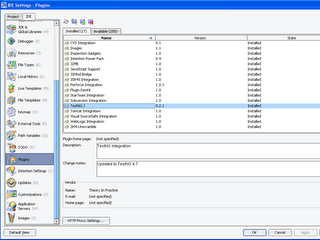
Figure 1 - Download and install the TestNG plug-in for IDEA [click on image to enlarge]

  • Download and install the TestNG-J plug-in from the right hand side panel. This will integrate the library with IDEA. You may need to restart the IDE for the changes to take effect.
  • Right-click on the newly created project and choose Module Settings.
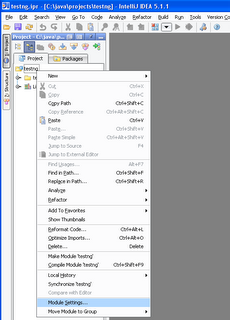
Figure 2 - Module Settings of project [click on image to enlarge]

  • On the Module Settings panel, pick the Libraries (Classpath) tab, and then choose Add Jar/Directory to add the TestNG's jar to your project's classpath. I'm using JDK5.0, so I chose the testng-5.0-jdk15.jar archive.
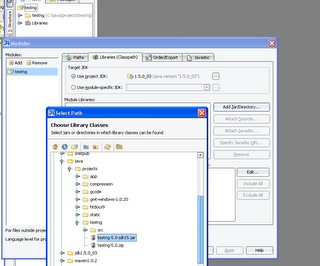
Figure 3 - Add TestNG jar to project's classpath [click on image to enlarge]

This completes the integration of the testing library with IDEA, and we are now ready to write and test some code.


Exploring the Next Generation of Testing

Simply put, a TestNG unit test class is a POJO with annotated methods. There is no requirement to extend a specific class or implement a specific interface, just tag methods with Java annotations. A very simple Test class looks like this:

package testng.basic;

import org.testng.annotations.Test;

public class FirstTest {
public FirstTest() {
}
@Test
public void isOneEqualsTwo(){
assert(1 == 2);
}
}

I wrote a simple Java class and will use it to illustrate some key features of TestNG, namely the ability to specify individual method thread pools, the ability to specify certain test methods as dependent on the successful completion of others, and the seamless integration with IDEA.

Create a new class named ThreadUnsafe on IDEA and copy and paste the code below:


import org.testng.annotations.Test;
public class ThreadUnsafe {
private static int[] accounts = new int[] {0, 0};
private static int MAX = 1000;

@Test(threadPoolSize = 1000, invocationCount = 1000, timeOut = 2000)
public void swap(){
int amount = (int) (MAX * Math.random());
accounts[1] += amount;
accounts[0] -= amount;
System.out.println("Account[0]: " + accounts[0]);
System.out.println("Account[1]: " + accounts[1]);
int balance = checkBalance();
assert(balance == 0);
}
public int checkBalance(){
int sum = 0;
for (int i = 0; i < accounts.length; i++){
sum += accounts[i];
}
System.out.println("Balance : " + sum);
return sum;
}
public static void main(String[] args){
ThreadUnsafe tu = new ThreadUnsafe();
tu.swap();
}
}


ThreadUnsafe
is a very simple class that swaps random values from one account to another, ensuring the balance remains zero. That is, when we add an amount to one of the accounts, we subtract the same amount from the other.

Compile and run the code. It should exit printing Balance : 0.

Specifying thread pools

The only different and interesting thing on the code above is the annotation @Test on method swap():
@Test(threadPoolSize = 1000, invocationCount = 1000, timeOut = 2000)

This annotation is saying "give me a pool of 1000 threads, invoke this 1000 times, and exit if an invocation takes longer than 2000 milliseconds to return".
If a method takes longer than the specified timeout, TestNG will interrupt the method and mark it as unsuccessful.

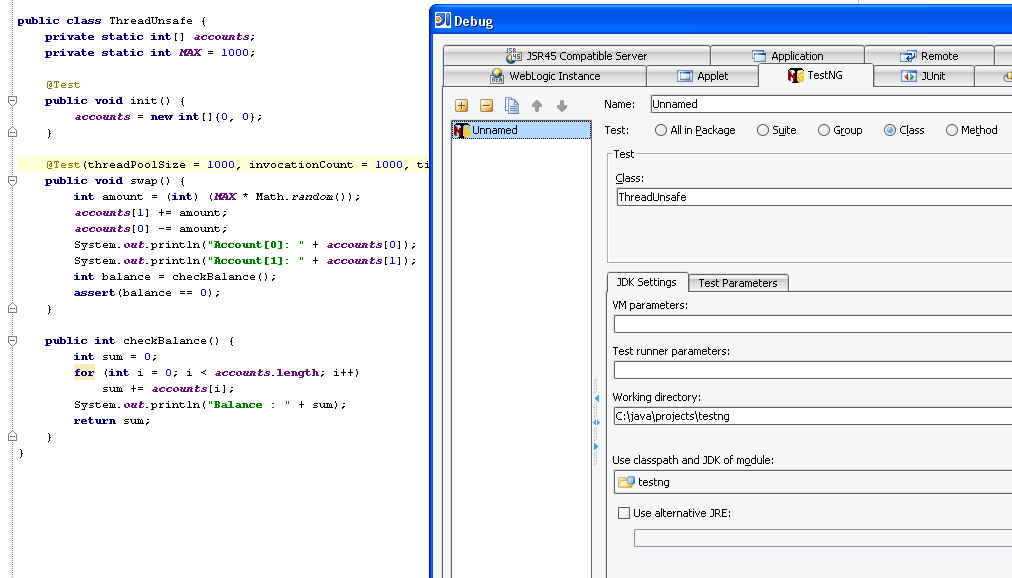
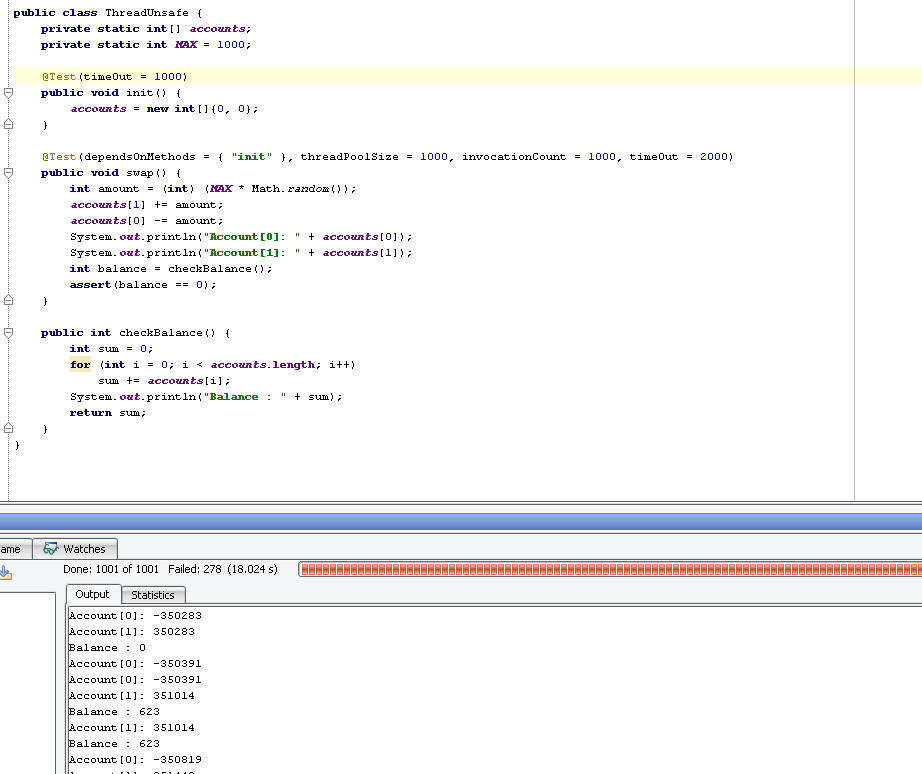
To debug this sample project select the TestNG tab from the Debug panel. From there we can specify the desired granularity of the test, which can range from the swap() method to the whole package. I chose to test the ThreadUnsafe class itself.
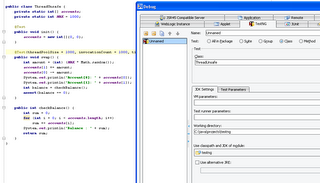
Figure 4 - Debug granularity of TestNG [click on image to enlarge]

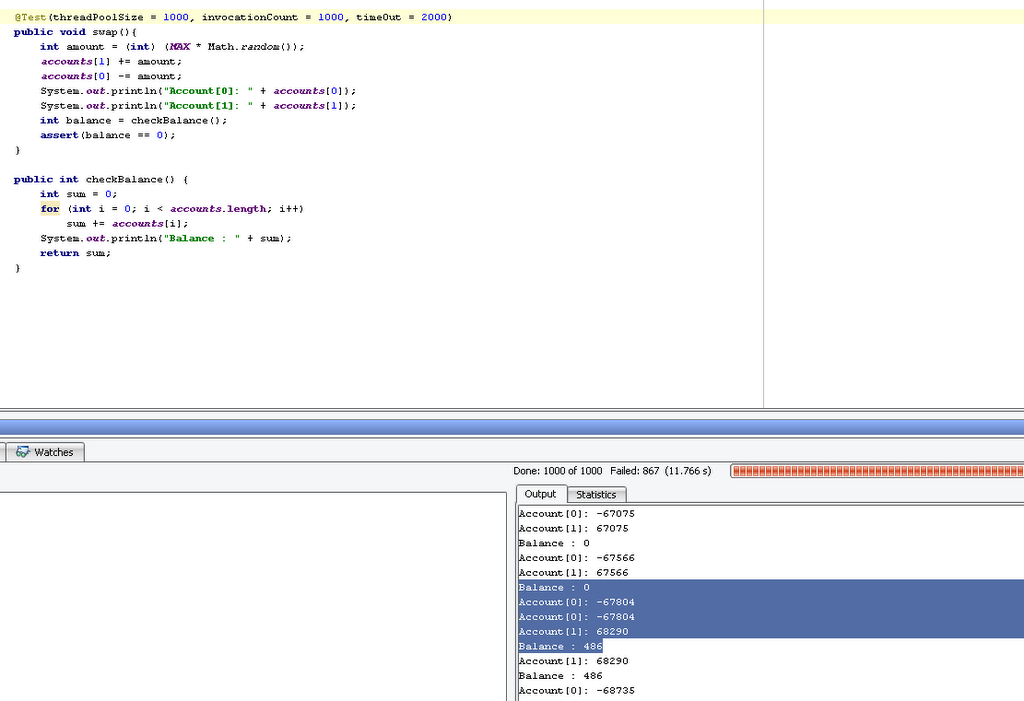
The output of running the project in debug mode can be seen below (values will vary):
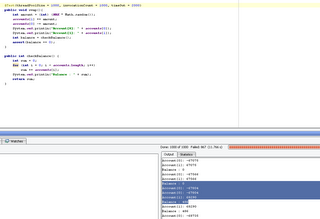
Figure 5 - TestNG output [click on image to enlarge]

On the output console shown above we can see that after a few successful runs the value of Balance is 0 as expected. However, later on some weird values start showing up. Thus, multiple threads interfered with each other and the test shows the code to be thread unsafe.

This brute force thread safety testing can be useful to confirm a bug report due to improper synchronization, though it can be tricky to come up with a representative number of threads and repetitions.

Specifying method dependencies

The ability to specify certain test methods as dependent on the successful completion of others is a very useful feature. Let's move the initialization into a method of its own. Note changes on the accounts variable declaration and init() method.


import org.testng.annotations.Test;

public class ThreadUnsafe {
private static int[] accounts;
private static int MAX = 1000;
@Test
public void init() {
accounts = new int[]{0, 0};
}
@Test(threadPoolSize = 1000, invocationCount = 1000, timeOut = 2000)
public void swap(){
int amount = (int) (MAX * Math.random());
accounts[1] += amount;
accounts[0] -= amount;
System.out.println("Account[0]: " + accounts[0]);
System.out.println("Account[1]: " + accounts[1]);
int balance = checkBalance();
assert(balance == 0);
}
public int checkBalance(){
int sum = 0;
for (int i = 0; i < accounts.length; i++){
sum += accounts[i];
}
System.out.println("Balance : " + sum);
return sum;
}
public static void main(String[] args){
ThreadUnsafe tu = new ThreadUnsafe();
tu.init();
tu.swap();
}
}

The difference from the previous code is that initialization is now done on the init() method, which is itself a @Test annotated method that will be included in the testing report.

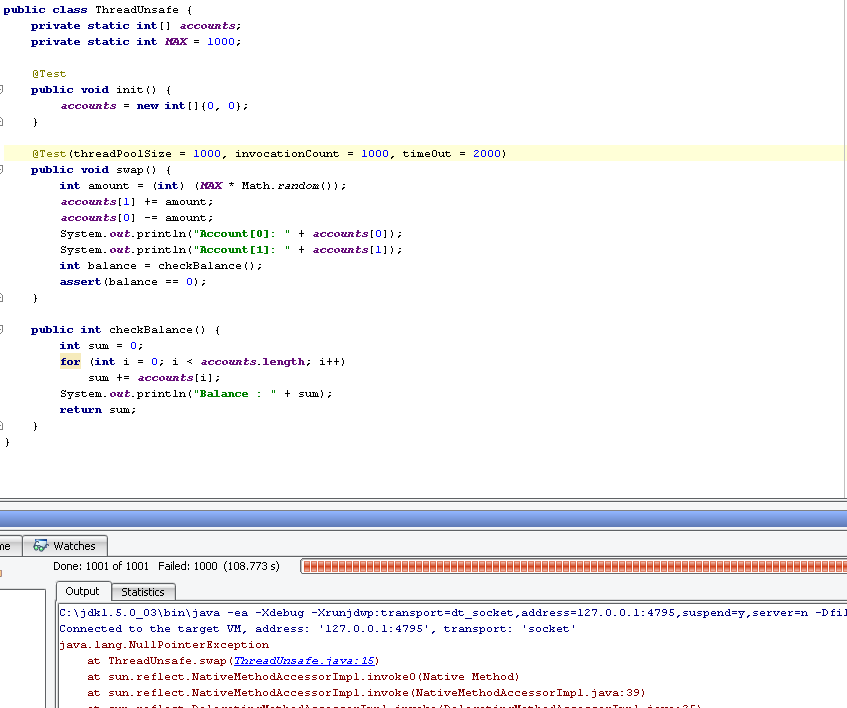
Now running the code in Debug TestNG mode results in an error because the array accounts used by the swap() method has not been initialized.

Figure 6 - NullPointerException caused by non-initialized dependency [click on image to enlarge]


What we want here is the ability to tell that a certain test method, swap(), depends on the successful completion of a previous test method, init().
We want to guarantee that certain methods or groups of methods are always invoked before others.

TestNG let's us do that with the dependsOnMethods annotation.
To specify swap() as being dependent on the successful execution of init(), we use the dependsOnMethods annotation as shown below:


@Test(dependsOnMethods = {"init"}, threadPoolSize = 1000, invocationCount = 1000, timeOut = 2000)
public void swap() {
...
}

Running the code in debug TestNG mode now results in a successful execution:
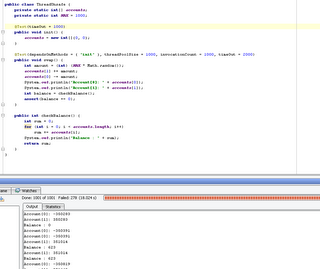
Figure 7 - Method dependency with TestNG [click on image to enlarge]

For unreliable systems TestNG introduces the notion of partial failure:
@Test(timeOut = 10000, invocationCount = 1000, successPercentage = 98)
public void waitForAnswer() {
while (!success){
Thread.sleep(1000);
}
}

The example above instructs TestNG to invoke the method a thousand times, but to consider the overall test passed even if only 98% of them succeed.

All the above are simple yet very powerful examples that are either very hard or impossible to do with JUnit.

Resources

Thursday, August 17

Business need: Digg for Consumer Electronics

I'm on the prowl for new gadgets (smart-phone, wide-screen TV, games console), and I think a market like Digg for consumer electronics would help prune the search space.
With the number and combination of brands, specs, makers, designs, features, personal preferences and whatnot involved, such an application would tap into the wisdom of crowds and transform many diverse opinions into a single collective judgement.
This is the central thesis of the Wisdom of Crowds:

"With most things, the average is mediocrity. With decision making, it's often
excellence. We've been programmed to be collectively smart
".


I hope this is what Jay Adelson [Digg's current CEO] means when he says:
"The best I can tell you is Digg as a concept can be applied to other content aside from news. Just wait and see what we’re going to apply it to."


In fact, Amazon is also in a good place to experiment with crowdsorting their results pages (and when you're at it Amazon, please let us also do column sorting so that we don't need to navigate through pages of results that we don't care about to find what we want).


[Update]:
Product Clash's clash and compare feature almost nails it:
"Now you can clash and compare your best consumer products for low price offers.
Product Clash features cheap cameras, cheap cell phones, cheap computers, cool
gadgets, cheap home entertainment, cheap peripherals and portable media
comparison clashes! Clashing is fun for movies, music, games and DVDs."


Useful Links:
Venture Voice Show #37 - Jay Adelson of Digg
The Wisdom of Crowds
Independent Individuals and Wise Crowds
The Observer: Here's Hoping This Group-Think Effort Is Full Of Wisdom
http://en.wikipedia.org/wiki/Crowdsourcing

The road ahead for OpenOffice

I agree 100% with these arguments, being an active but often frustrated OO user for over 5 years.
Decoupling the document from the vendor suite (with the Open Document format) was a tremendous achievement, but the road ahead for OO does not look so promising:

  • Instead of redefining and redesigning an Office suite tailored to user needs it is developing into a pale, MS Office-wannabe sibling. It confuses the (real) user need of a better Office suite with that of an open alternative to MS Office.
  • It has most of the same flaws of (older) MS Office with less of its (newer) functionality. The trade off is to its disadvantage, since it's now playing to catch-up with competition that is evolving.
  • It is still very buggy in critical areas such as the spell-checker and word count, which were also introduced late as proper features.
  • It is not modular, forcing one huge download and installation of the whole suite. I'd like to, in true open market fashion, be able to choose and use the best components from each suite.
  • It has a very slow and clumsy release cycle. The early 2.0 beta was an embarrassment.
  • It doesn't clean-up properly after an uninstall. There are no excuses for this.
  • It lacks a much needed auto-update feature. For the average computer user, upgrading a release is a pain.
  • Last but not least, it lacks truthful, constructive, and objective criticism -criticism is often regarded as a nod towards Microsoft. Most users and adopters of OO tend to be people that are somewhat partial in their reviews. The views within some parts of the open-source community mix blind, anti-corporate bashing with the open source ideal.
I tend to regard the less-than-100% compatibility issue as an overall successful struggle to reverse-engineer a proprietary document format.

As it stands, OO is an alternative to MS Office, which is a good thing to have. In fact, it is the alternative to MS Office.
But mostly for monetary or ideologic reasons, not based on the quality of the offering.

Friday, July 21

5 Useful Python Tips

Here are a few useful Python tips I’ve learned over time.


1. When using the '%' format operator always put a tuple or a dictionary on the right hand side.


Instead of:
  print "output %s" % stuff


Write:
  print "output %s" % (stuff,)


With the tuple on the right hand side, if stuff is itself a tuple with more than one element we'll still get its representation instead of an error.


Example:
  >>> def output(arg):
            print "output %s" % arg

  >>> output("one item")
  output one item

  >>> output(('single tuple',))
  output single tuple

  >>> output(('tuple','multiple','items'))

  Traceback (most recent call last):
  File "", line 1, in -toplevel-
  output(('tuple','multiple','items'))
  File "", line 2, in output
  print "output %s" % arg
  TypeError: not all arguments converted during string formatting


Now, if the function output is changed to:
  >>> def output(arg):
            print "output %s" % (arg,)

  >>> output(('tuple','multiple','items'))
  output ('tuple', 'multiple', 'items')


It will always work as intended and expected.


2. Use the built-in timer function proactively and aggressively to avoid "premature pessimization".


Python has a very useful built-in timing framework, the timeit module, which can be used interactively to time the execution of short pieces of code.
Suppose we want to find out if a hypothetical word_count implementation is faster using the split() method or using a loop.
We'd like to implement each variant, call each implementation many times, repeat the entire test a few times, and select the one that took the least time.

Timeit.py to the rescue. Let's test the implementation using split() first.

  >>> import timeit
  >>> def word_count():
            s = "long string with several words to be counted "
            return len(s.split())

  >>> word_count()
  8

  >>> t = timeit.Timer(setup ='from __main__ import word_count', stmt='word_count()')

  >>> t.repeat(3, 1000000)
  [4.6016188913206406, 4.5184541602204717, 4.5227482723247476]


And now let's test a loop variant.
  >>> def word_count():
            s = "long string with several words to be counted "
            return len([c for c in s if c.isspace()])

  >>> word_count()
  8

  >>> t = timeit.Timer(setup ='from __main__ import word_count', stmt='word_count()')

  >>> t.repeat(3, 1000000)
  [17.766925246011169, 17.784756763845962, 17.890987803859275]


We have our informed answer right there and then.


The first argument of repeat() is the number of times to repeat the entire test, and the second argument is the number of times to execute the timed statement per test.


You can even select the best out of X runs (3 on this example) by using the min function
  >>> min(t.repeat(3, 1000000))
  17.766925246011169


We can try and compare other implementations such as a loop without the (expensive) call to isspace().

  >>> def word_count():
            s = "long string with several words to be counted "
            return len([c for c in s if c == ' '])

  >>> word_count()
  8

  >>> t = timeit.Timer(setup ='from __main__ import word_count', stmt='word_count()')

  >>> t.repeat(3, 1000000)
  [8.8144601897920438, 8.7707542444240971, 8.7721205513323639]


Which proves faster than our second implementation but still slower than calling split().


Note:
Instead of repeat() we can call timeit(), which calls the function 1 million times and returns the number of seconds it took to do it.


3. Don't traverse to append, extend instead.


Don't do:
  >>> def bad_append():
            l1 = ["long","string","with","long"]
            l2 = ["elements","and","words","to","be","counted","or","words"]
            for item in l2:
                  l1.append(item)

  >>> t = timeit.Timer(setup ='from __main__ import bad_append', stmt='bad_append()')

  >>> min(t.repeat(3, 1000000))
  5.4943255206744652


Do instead:
  >>> def good_append():
            l1 = ["long","string","with","long"]
            l2 = ["elements","and","words","to","be","counted","or","words"]
              l1.extend(l2)

  >>> t = timeit.Timer(setup ='from __main__ import good_append', stmt='good_append()')

  >>> min(t.repeat(3, 1000000))
  2.3049167103836226


Calling extend() results in an almost 60% performance gain.


4. Beware of doing string concatenation using '+'.


Let's see why with "no fluff just stuff" by applying golden rule 2 above.
Bad:
  >>> def bad_concat():
            s = ""
            l = ["items", "to", "append"]
            for sub in l:
                  s += sub

  >>> t = timeit.Timer(setup ='from __main__ import bad_concat', stmt='bad_concat()')

  >>> min(t.repeat(3, 1000000))
  1.6777893348917132


Better:
  >>> def good_concat():
            s = ""
            l = ["items", "to","append"]
            s = "".join(l)

  >>> t = timeit.Timer(setup ='from __main__ import good_concat', stmt='good_concat()')

  >>> min(t.repeat(3, 1000000))
  1.3923049870645627


Needless to say all this adds up if these operations are done repeatedly and with bigger lists.


Also avoid:
  out = "output: " + output + ", message: " + message + ", param: " + param


Instead, use:
  out = "output: %s, message: %s, param: %s" % (output, message ,param, )


Which neatly combines rules 1 and 4.


5. Environment settings and variables are available cross-platform.


This is a very handy feature. Take a close look at os.path.expanduser() and os.environ on Linux and Windows.


*Nix:
  >>> import os
  >>> os.path.join(os.path.expanduser('~'))
  '/home/jcastro/'


Windows:
  >>> import os
  >>> os.path.join(os.path.expanduser('~'))
  'C:'


Useful Online Resources

The Python Coding Conventions
Python Performance Tips
Patterns in Python
Data Structures and Algorithms with Object-Oriented Design Patterns in Python
The Python Tutor Mailing List
My Python links on del.icio.us

Saturday, July 15

Happy Feet

Shown tonight, during the opening of Superman Returns


More here.

Thursday, July 13

RIP Syd


Thank you for the wonderful legacy.

Sunday, June 18

What's in a Name?

I had a Malay housemate called Kamarun Kamarundil (he would, when introduced, always give the shorter version Nick).
I have a Thai friend called Kamontip Sapphawaht.
I absolutely love their names, and can already see the trailer for a Hollywood romantic blockbuster titled When Kamarun Kamarundil met Kamontip Sapphawaht...

Monday, June 12

John Long Prize

On a letter dated November 2005 that I only had access to yesterday, I found out that my thesis was awarded the "John Long Prize for best research thesis"!

Thank you very much to all those mentioned in my acknowledgments section (and maybe a few others who were sadly forgotten)
If there is any cash involved a promise will be made right here and now to spend (some of) it well and wisely on a nice open BBQ with free drinks for all!
(sadly, no cash prize = no free BBQ+drinks for all)

Now ain't I a happy, lucky chap...

Monday, May 1

Out of (the) Box

Things I am missing from Box.net:

  1. Drag-and-drop files onto newly created folders. Currently we can change a file's location through its contextual drop-down menu)
  2. Share folders by drag-and-drop. Currently we have to share files by ticking each checkbox individually.
  3. Email notifications when friends access/download shared files. Otherwise, we have to poll them to acknowledge receipt.
So no, I don't think Box gets it yet.

Amazon suggests

http://www.mybigriver.com/